

Example of HTML Template in ASP.NET MVC Tooltip Control
This sample demonstrates customizing tooltip content to display a HTML page.
Eastern Bluebird
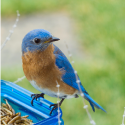
Eastern bluebirds can be very vocal in flocks. Their calls include a rapid, mid-tone chatter and several long dropping pitch calls.
@Html.UiButton(new UiButtonOptions { Id = "content", Text = "HTML Template", Variant = UiButtonVariant.Outline, Color = UiButtonColor.Primary })

@Html.UiTooltip(new UiTooltipOptions
        {
            Id = "tooltip", Target = "#content", CssClass = "e-tooltip-css", Position = UiTooltipPosition.BottomCenter, OpensOn = UiTooltipOpensOn.Click,
            Template = @<div id="democontent" class="democontent">
                <div class="info">
                    <h3 style="margin-top: 10px">Eastern Bluebird <hr style="margin-top: 10px" /></h3>
                    <div style="overflow: hidden">
                        <div style="float: left; width: 57%">The <a href="https://en.wikipedia.org/wiki/Eastern_bluebird" target="_blank" rel="noopener noreferrer">Eastern Bluebird</a> is easily found in open fields and sparse woodland areas, including along woodland edges. These are <i>cavity-nesting birds</i> and a pair of eastern bluebirds will raise 2-3 broods annually, with 2-8 light blue or whitish eggs per brood.</div>
                        <div id="bird" style="float: right; width: 42%"><img id="templateImg" width="125" height="125" src="@Url.Content("~/Content/tooltip/bird.png")" alt="Eastern Bluebird" /></div>
                    </div>
                    <hr />
                    <p>Eastern bluebirds can be very vocal in flocks. Their calls include a rapid, mid-tone chatter and several long dropping pitch calls.</p>
                    <p>Source:<br /><a href="https://en.wikipedia.org/wiki/Eastern_bluebird" target="_blank" rel="noopener noreferrer">https://en.wikipedia.org/wiki/Eastern_bluebird</a></p>
                </div>
            </div>
        })
<style>
.control-section { padding: 10px 15px; }
.property-row { display: flex; gap: 12px; align-items: center; justify-content: space-between; padding: 8px 0; }
#customization { padding: 40px 20px; }
.democontent { width: 360px; max-width: 100%; font-size: 13px; }
</style>
<div id="htmlTemplate" class="control-section">
    <div id="customization">
        @Html.UiButton(new UiButtonOptions { Id = "content", Text = "HTML Template", Variant = UiButtonVariant.Outline, Color = UiButtonColor.Primary })
        @Html.UiTooltip(new UiTooltipOptions
        {
            Id = "tooltip", Target = "#content", CssClass = "e-tooltip-css", Position = UiTooltipPosition.BottomCenter, OpensOn = UiTooltipOpensOn.Click,
            Template = @<div id="democontent" class="democontent">
                <div class="info">
                    <h3 style="margin-top: 10px">Eastern Bluebird <hr style="margin-top: 10px" /></h3>
                    <div style="overflow: hidden">
                        <div style="float: left; width: 57%">The <a href="https://en.wikipedia.org/wiki/Eastern_bluebird" target="_blank" rel="noopener noreferrer">Eastern Bluebird</a> is easily found in open fields and sparse woodland areas, including along woodland edges. These are <i>cavity-nesting birds</i> and a pair of eastern bluebirds will raise 2-3 broods annually, with 2-8 light blue or whitish eggs per brood.</div>
                        <div id="bird" style="float: right; width: 42%"><img id="templateImg" width="125" height="125" src="@Url.Content("~/Content/tooltip/bird.png")" alt="Eastern Bluebird" /></div>
                    </div>
                    <hr />
                    <p>Eastern bluebirds can be very vocal in flocks. Their calls include a rapid, mid-tone chatter and several long dropping pitch calls.</p>
                    <p>Source:<br /><a href="https://en.wikipedia.org/wiki/Eastern_bluebird" target="_blank" rel="noopener noreferrer">https://en.wikipedia.org/wiki/Eastern_bluebird</a></p>
                </div>
            </div>
        })
    </div>
</div>
using System;
using System.Collections.Generic;
using System.Linq;
using System.Web.Mvc;
using Lumen.UI.Mvc;

namespace YourApp.Controllers
{
    public class TooltipController : Controller
    {
        // The page is Views/Tooltip/HtmlTemplate.cshtml; it draws what ViewData holds.
        public ActionResult HtmlTemplate()
        {
            return View();
        }
    }
}
@* Install once: Install-Package Lumen.UI.Mvc   (or: dotnet add package Lumen.UI.Mvc) *@

@* Views/Web.config: <add namespace="Lumen.UI.Mvc" /> *@

@* Views/Shared/_Layout.cshtml *@
<head>
    @Html.UiStyles()
    <link rel="stylesheet" href="~/Content/site.css" />
</head>
<body>
    @RenderBody()
    @Html.UiScripts()
    @RenderSection("scripts", required: false)
</body>
Tooltip content has been customized using HTML tags and CSS, i.e. the content can be loaded with HTML tags. Title can also be added to the content. Overall, the tooltip content can be customized to appear like a web page.