

Example of Template in ASP.NET MVC Toast Control
This sample render toast using static and dynamic template loaded on demand.
Weekend Alarm
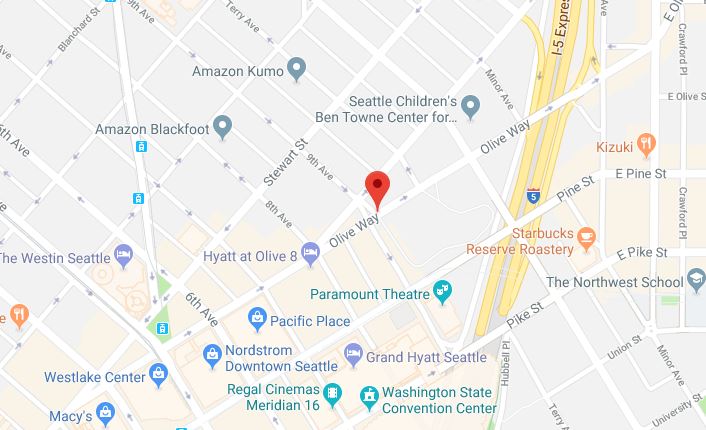
Snooze for
@Html.UiButton(new UiButtonOptions { Id = "toast_mail_remainder", Text = "Mail Reminder" })

@Html.UiButton(new UiButtonOptions { Id = "Alarm_turn_on", Text = "Turn on Alarm" })

@Html.UiToast(new UiToastOptions { Id = "toast_custom", Template = "#toastEmail_template", Position = UiToastPosition.TopRight, Timeout = 0, ShowCloseButton = true, NewestOnTop = true, Width = "320px" })

@Html.UiToast(new UiToastOptions { Id = "toast_template", Template = "#template_toast_ele", Position = UiToastPosition.TopRight, Timeout = 120000, Width = "340px" })
<style>
.toast-default-section .control_wrapper, .toast-pos-section .control_wrapper, .toast-api-section .control_wrapper, .toast-template-section .control_wrapper { max-width: 760px; margin: 0 auto; padding: 20px 0; }
.toast-center { text-align: center; }
.toast-center .ui-btn, .toast-center button { margin: 5px; }
.toast-panel-row { display: flex; align-items: center; justify-content: space-between; gap: 12px; padding: 6px 0; }
.toast-icon-meeting { background-color: currentColor; -webkit-mask: url("data:image/svg+xml,%3Csvg xmlns='http://www.w3.org/2000/svg' viewBox='0 0 24 24'%3E%3Cpath d='M17 12h-5v5h5v-5zM16 1v2H8V1H6v2H5c-1.11 0-1.99.9-1.99 2L3 19c0 1.1.89 2 2 2h14c1.1 0 2-.9 2-2V5c0-1.1-.9-2-2-2h-1V1h-2zm3 18H5V8h14v11z'/%3E%3C/svg%3E") no-repeat center / contain; mask: url("data:image/svg+xml,%3Csvg xmlns='http://www.w3.org/2000/svg' viewBox='0 0 24 24'%3E%3Cpath d='M17 12h-5v5h5v-5zM16 1v2H8V1H6v2H5c-1.11 0-1.99.9-1.99 2L3 19c0 1.1.89 2 2 2h14c1.1 0 2-.9 2-2V5c0-1.1-.9-2-2-2h-1V1h-2zm3 18H5V8h14v11z'/%3E%3C/svg%3E") no-repeat center / contain; }
.toast-template-targets { display: flex; gap: 24px; justify-content: space-between; flex-wrap: wrap; }
.toast-template-targets > div { flex: 1 1 320px; min-height: 120px; }
.e-toast-template { display: flex; align-items: center; gap: 12px; }
.e-toast-image { width: 40px; height: 40px; border-radius: 50%; object-fit: cover; }
.e-toast-title { font-weight: 600; }
.horizontal-align { display: flex; gap: 12px; align-items: flex-start; }
.toast-alarm-icon { width: 40px; height: 40px; }
.toast-title { font-weight: 600; }
.snooze { margin: 8px 0 4px; font-size: 13px; }
.snoozeBtn { margin-top: 8px; }
</style>
<template id="toastEmail_template">
    <div class="e-toast-template">
        <img class="e-toast-icon e-toast-image" src="${image}" alt="" />
        <div class="e-toast-message">
            <div class="e-toast-title">${from}</div>
            <div class="e-toast-content">${subject}</div>
        </div>
    </div>
</template>
<template id="template_toast_ele">
    <div id="template_toast">
        <div class="horizontal-align">
            <img class="toast-alarm-icon" src="@Url.Content("~/Content/toast/alarm.png")" alt="" />
            <div class="toast-content">
                <div class="toast-title">Weekend Alarm</div>
                <div class="toast-message">With traffic, its likely to take 45 minutes to get to jenny's 24th Birthday Bash at Hillside Bar, 454 E. Olive Way by 10:00 PM</div>
            </div>
        </div>
        <img src="@Url.Content("~/Content/toast/map.jpg")" alt="Map" width="100%" />
        <div class="snooze"> Snooze for </div>
        <div id="snoozedropDown">
            <select id="snoozeDD">
                <option value="2">2 minutes</option>
                <option value="5">5 minutes</option>
                <option value="10">10 minutes</option>
            </select>
        </div>
        <div class="snoozeBtn">
            <button type="button" id="snooze" class="e-btn e-flat e-primary" style="margin-right: 15px;" data-ui-toast-close> Snooze </button>
            <button type="button" id="dismiss" class="e-btn e-flat e-primary" data-ui-toast-close> Dismiss </button>
        </div>
    </div>
</template>
<div class="control-section toast-template-section">
    <div class="control_wrapper">
        <div id="reminder" class="toast-center">
            @Html.UiButton(new UiButtonOptions { Id = "toast_mail_remainder", Text = "Mail Reminder" })
            @Html.UiButton(new UiButtonOptions { Id = "Alarm_turn_on", Text = "Turn on Alarm" })
        </div>
        <div class="toast-template-targets">
            <div id="toast_custom_target">
                @Html.UiToast(new UiToastOptions { Id = "toast_custom", Template = "#toastEmail_template", Position = UiToastPosition.TopRight, Timeout = 0, ShowCloseButton = true, NewestOnTop = true, Width = "320px" })
            </div>
            <div id="toast_template_target">
                @Html.UiToast(new UiToastOptions { Id = "toast_template", Template = "#template_toast_ele", Position = UiToastPosition.TopRight, Timeout = 120000, Width = "340px" })
            </div>
        </div>
    </div>
</div>
<script>
    // Syncfusion: Mail Reminder shows the next mail as a toast made from a template; Turn on Alarm shows an alarm toast that can be snoozed or dismissed
    var toastData = [
        { from: " Anjolie Stokes", subject: "Networking Referral", image: '@Url.Content("~/Content/toast/laura.png")' },
        { from: " Ila Russo", subject: "Business dinner invitation", image: '@Url.Content("~/Content/toast/janat.png")' },
        { from: " Camden Mcmillan", subject: "Reference Request - Cameran Hester", image: '@Url.Content("~/Content/toast/michael.png")' },
        { from: " Chase Solomon", subject: "New business relationship confirmation", image: '@Url.Content("~/Content/toast/janat.png")' },
        { from: " Inga Scott", subject: "Application for Sales Associate", image: '@Url.Content("~/Content/toast/michael.png")' }
    ];
    var toastFlag = 0;
    var snoozeTimer = null;
    function mail() { return window.Lumen.get('toast_custom'); }
    function alarm() { return window.Lumen.get('toast_template'); }
    function showMail() {
        mail().setOptions({ animation: { show: { effect: 'SlideRightIn' }, hide: { effect: 'SlideRightOut' } } });
        mail().show({ data: toastData[toastFlag] });
        toastFlag = (toastFlag + 1) % toastData.length;
    }
    function showAlarm() { alarm().hideAll(); alarm().show({ title: 'Weekend Alarm', content: 'alarm' }); }
    document.addEventListener('click', function (e) {
        var hit = e.target.closest ? e.target.closest('button') : null;
        if (!hit) { return; }
        if (hit.id === 'toast_mail_remainder') { showMail(); }
        else if (hit.id === 'Alarm_turn_on') { showAlarm(); }
        else if (hit.id === 'snooze') {
            var minutes = parseInt((document.getElementById('snoozeDD') || {}).value, 10) || 2;
            clearTimeout(snoozeTimer);
            snoozeTimer = setTimeout(showAlarm, minutes * 60000);
        }
    });
    window.addEventListener('load', function () { setTimeout(showMail, 500); });
</script>

<script>
(function (window, document) {
    'use strict';
    var callers = [{ name: 'Mira Sato', initials: 'MS' }, { name: 'Theo Kim', initials: 'TK' }];
    var calls = 0;
    var show = document.getElementById('toastTemplateShow');
    if (show) {
        show.addEventListener('click', function () {
            var toaster = window.Lumen.get('toastTemplate');
            if (!toaster) { return; }
            var caller = callers[calls++ % callers.length];
            toaster.show({ title: 'Incoming call', data: caller });
            window.NotificationSampleLog('Call from ' + caller.name + ' shown.');
        });
    }
    document.addEventListener('click', function (e) {
        var action = e.target.closest('[data-call-action]');
        if (action) { window.NotificationSampleLog('Call: ' + action.getAttribute('data-call-action') + ' (simulated).'); }
    });
})(window, document);
</script>
using System;
using System.Collections.Generic;
using System.Linq;
using System.Web.Mvc;
using Lumen.UI.Mvc;

namespace YourApp.Controllers
{
    public class ToastController : Controller
    {
        // The page is Views/Toast/Template.cshtml; it draws what ViewData holds.
        public ActionResult Template()
        {
            return View();
        }
    }
}
@* Install once: Install-Package Lumen.UI.Mvc   (or: dotnet add package Lumen.UI.Mvc) *@

@* Views/Web.config: <add namespace="Lumen.UI.Mvc" /> *@

@* Views/Shared/_Layout.cshtml *@
<head>
    @Html.UiStyles()
    <link rel="stylesheet" href="~/Content/site.css" />
</head>
<body>
    @RenderBody()
    @Html.UiScripts()
    @RenderSection("scripts", required: false)
</body>
This sample illustrates the way to display the template content on the toast. With the usage of Template, the user can format and structure the HTML content to be displayed on the toast as per their application needs.
- Alarm toast is integrated with button and drop-down list that allows to set timeOut for toast and close it.
- Dynamic toast opened based on the data source given to add mail reminder notifications and it can be hidden using the close button available.